Confirm a person or business is who they claim to be: government IDs, biometrics, business registries and employment checks against authoritative Australian sources.
Meet AUSTRAC obligations and understand customer risk: screening, risk assessment, fraud controls and investigation tools with evidence recorded for each check.
Find people and review person information from the details you hold: search by name, phone, email or address, follow connected records and continue into broader investigation tools.
Keep customer records accurate and put them to work: correct and enrich existing data, unify it into a single view, or build compliant marketing lists from opted-in records.
The WatchEye API gives programmatic access to everything in WatchEye: PEP and sanctions screening, identity checks, IDPass verifications, monitoring programs, events and reports.
Bring identity verification, business checks and screening into your client due diligence process. Use Global Data tools to collect evidence, review findings and support ongoing checks according to your AML/CTF program.
QI-74-81E-38BID PassVerification Failed (ID Pass expired)
/Single DVS ID check
Document type
Drivers Licence (DVS)
First nameJohnLast nameCitizenDate of birth01/01/1980StateVICLicence number012345678Card numberP1234567
The customer has consented to this identity check.Run ID checkChecking with DVS
/Quick ID Checks
Quick ID Checks › QI-7A-2D1-C94Help
Move to ProgramDownload CertificateDelete Check
Identification Verified• Verification PassedUse the Download Certificate button to download the Verification Certificate.
ID Check - Drivers Licence
Verification StatusPass
ID TypeDrivers Licence
Check TypeDrivers Licence (DVS)
Checked AtWed 14 Oct 2026 10:42am
Drivers Licence Details
First nameJohn
Last nameCitizen
Date of birth01 Jan 1980
StateVIC
Verification Details
DVS Result codeY
Verification request number3f9c2a71-8b4e-4d0a
Originating agency codeAGY1
Checking details with the DVS…
ID VerificationSample Legal
Welcome to Global Data ID Pass
Sample Legal has asked you to verify your identity. It takes a few minutes on your phone.
You will complete these steps:
Face verificationA short selfie video to confirm it is you.
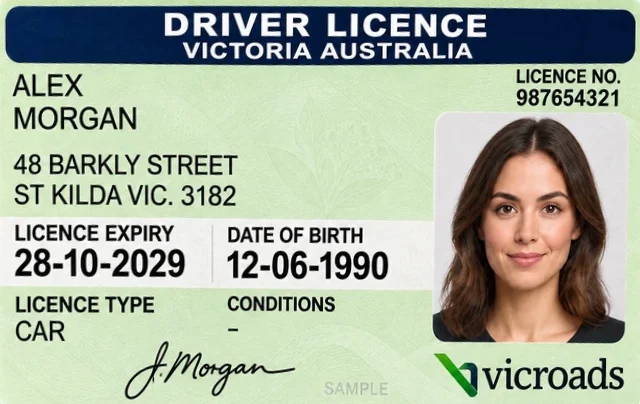
ID document checkPhotograph your licence or passport.
Get started
Licence front
FrontBack
Fit the front of your licence inside the frame. Keep the photo clear of glare.
Captured
Hold steady…Front captured. Now the back.
Take photo
Face verification
Keep your face inside the oval and follow the prompts.
00:00
Look straight at the cameraSlowly turn your head leftLook straight aheadSlowly turn your head rightHold stillNow give a small smileAnalysing your video…Face verification complete
Remove hats and sunglasses. Find good light.
Identity verification complete
Thank you. Your details have been sent securely to Sample Legal.
You can now close this window.
Illustrative WatchEye Quick ID Check and ID Pass screens with mock data and specimen documents. Checks and access depend on your configuration.
Tranche 2 obligations commenced on 1 July 2026 for newly regulated designated services. Whether your business is covered depends on the services you provide, not simply your profession.
Relevant sectors include:
Legal services
Conveyancing
Accounting
Real estate
Trust and company services
Dealing in precious metals and stones
Use AUSTRAC's guidance to establish which activities are in scope before selecting your client-check process.
Start with the client and the service being provided. Decide which information and checks your process requires, review the findings, and record your decision. The workflow below shows where verification and screening tools can support that process.
Step 1
Step 1: Identify the client and relevant people
Establish what information and evidence the matter requires.
This sequence illustrates a business process. It does not imply that every step is automatic or that every listed check is required in every matter.
Identity checks
Verify clients remotely or through your team
Clients can complete verification remotely through a link, or your staff can run checks using details your team already holds. Choose the path that suits the client and the matter.
Path A · Client-completed
Client-completed verification with ID Pass
Create an ID Pass in WatchEye and send the client a secure link by SMS or email. They complete the document and liveness steps you choose, and the result comes back to WatchEye.
ID VerificationSample Legal
Welcome to Global Data ID Pass
Sample Legal has asked you to verify your identity. It takes a few minutes on your phone.
You will complete these steps:
Face verificationA short selfie video to confirm it is you.
ID document checkPhotograph your licence or passport.
Get started
Licence front
FrontBack
Fit the front of your licence inside the frame. Keep the photo clear of glare.
Captured
Hold steady…Front captured. Now the back.
Take photo
Face verification
Keep your face inside the oval and follow the prompts.
00:00
Look straight at the cameraSlowly turn your head leftLook straight aheadSlowly turn your head rightHold stillNow give a small smileAnalysing your video…Face verification complete
Remove hats and sunglasses. Find good light.
Identity verification complete
Thank you. Your details have been sent securely to Sample Legal.
You can now close this window.
The client opens the link from SMS or email on their phone. ID Pass shows your firm's name and the steps they will complete.The client opens the link from SMS or email on their phone. ID Pass shows your firm's name and the steps they will complete.They photograph their document on their phone. The details are read from the image and sent to the DVS.If the ID Pass includes a liveness check, a short selfie video confirms a real person is present and matches their face to their ID.The client sees a confirmation. The result appears in your Quick ID Check list with the liveness and document outcomes.
Illustration of the ID Pass flow with a sample firm and mock details. Steps depend on your configuration.
Quick ID checks are one-off ID checks your team runs manually in WatchEye. The result comes back immediately, and you don't need to add the person to a program first. Run a DVS check, or non-DVS checks against ASIC records, the Global Data universe, and payroll and superannuation data.
WatchEyeQuick ID Checks
Run DVS checkRun non-DVS checksCreate ID Pass
ID checkDocumentOutcome
QI-8D-2E5-04BPassportVerification Passed
QI-29-6C4-D18Drivers LicenceVerification Passed
QI-1A-6C0-9F2Medicare CardFailed: card number does not match
QI-C4-0A8-3B6Birth CertificateVerification Passed
QI-62-D9C-5A0VisaVerification Passed
WatchEyeQuick ID Checks › Run DVS check
Document type
Drivers Licence (DVS)
First nameJohnLast nameCitizenDate of birth01/01/1980StateVICLicence number012345678Card numberP1234567
The customer has consented to this identity check.Run ID checkChecking with DVS
WatchEyeQuick ID Checks › QI-7A-2D1-C94
Identification verifiedVerification Passed · Wed 14 Oct 2026, 10:42am
Download certificate
Document type
Drivers Licence (DVS)
VIC · Licence ******678 · Card *****567
DVS result
Match
Details match the issuer's record
Request reference
3f9c2a71-8b4e-4d0a
Kept with the check record
Consent record
Accepted by S. Taylor
Wed 14 Oct 2026, 10:42am
Checked: John Citizen, 01 Jan 1980
QI-7A-2D1-C94 certificate.pdfSaved
Checking details with the DVS…
Quick ID Checks lists recent checks with their outcome. Start a single DVS check from the panel at the top.Quick ID Checks lists recent checks with their outcome. Start a single DVS check from the panel at the top.Enter the details as they appear on the licence, confirm consent, then run the check.The result shows Identification verified with the DVS response. Download certificate saves a PDF that lists each detail checked and the DVS result.
Illustrative mockups with sample data, not product screenshots.
A DVS comparison checks supplied document details against issuer records. A matching response is not a complete fraud assessment, and it does not prove that the person presenting the document owns it. Biometric and liveness steps, where configured, are separate checks.
A business-client process may require more than a registration check. Review the organisation's details and identify the people whose ownership, control or role is relevant to your due diligence.
Record shareholdings as relationships. WatchEye’s UBO tab traces recorded ownership relationships through intermediate companies, adding up direct and indirect stakes. For example, 50% of a company that owns 40% of your client is a 20% indirect stake. A gaps table shows where a percentage is missing or the shareholdings don’t add up to 100%.
Global Data's KYB capability provides business-record and related-person information to support this work. Director, trustee and other control roles do not themselves contribute to ownership-percentage calculations, and a trust shareholder still needs a declaration, trust deed or other evidence. A shareholder list is not by itself conclusive proof of every beneficial owner.
WatchEye Relationships tab for Sample Client Pty Ltd: director Alex Sample, shareholder Jordan Sample with 60 percent, and shareholder Sample Family Trust with 40 percent, added manually.
Relationships found by a KYB check and those your team records sit together on the entity. A shareholder that is a trust is not the end of the chain: request a declaration, trust deed or other evidence to identify the beneficial owners, then record what was relied on.
Illustrative mockup of the WatchEye Relationships tab with sample data, not a product screenshot.
Screening
Screen clients for PEP and sanctions risks
Use WatchEye Quick Screen to screen a person or business against the sources you select, such as PEP and sanctions lists. Where a potential match is returned, compare the available identifying details and source information before deciding what it means for the client. Additional screening, such as adverse media, can support the review where appropriate.
Make the review decision explicit. A similar name is a finding to investigate, not proof that the client is the listed person. The example below follows a client already in a WatchEye program: a scheduled PEP and sanctions monitor returned a potential match and raised an Event for review. A one-off Quick Screen shows the same kind of match details.
C-01-062-B65John CitizenPEP and Sanction ScreeningNo PEP or sanction matchesPassThu 1 Oct 2026 1:30am
C-55-0AC-8DFAlex SamplePEP and Sanction Screening1 potential match to reviewWarningThu 1 Oct 2026 1:30am
C-02-A62-139Sample Client Pty LtdBusiness ScreeningNo adverse business recordsPassThu 1 Oct 2026 1:30am
C-1F-F0F-AB7John CitizenAdverse Media ScreeningNo adverse media matchesPassMon 28 Sep 2026 1:30am
C-37-501-810Alex SampleAdverse Media ScreeningNo adverse media matchesPassMon 28 Sep 2026 1:30am
Matter clients › Alex Sample › C-55-0AC-8DFExport PDF
Events
EV-7C-1B2-0A41 potential match to reviewNew
PEP and Sanction Screening
Screening check outcomeWarningScreening check summary1 potential match to reviewCheck dateThu 1 Oct 2026 1:30amScreening check detailsShow Full Request
Match 1 of 1
Matched nameAlexander SampelMatch type 82% · NameModerate match: manual review recommendedList sourcePEP listPositions heldLocal councillor (2004–2013)Date of birth07/11/1958Nationality and countryNew ZealandGenderMaleKnown aliasesAlex Sampel
Request Details×
PEP and Sanction Screening: request data
First nameAlexLast nameSampleDate of birth14/03/1986Middle name-CountryAU
Screening config
Name matching sensitivityStandardCountriesAll countriesSearch typeExact and near
Matter clients › Alex Sample › C-55-0AC-8DFExport PDF
Events
EV-7C-1B2-0A41 potential match to reviewNew
PEP and Sanction Screening
Screening check outcomeWarningScreening check summary1 potential match to reviewCheck dateThu 1 Oct 2026 1:30amScreening check detailsShow Full Request
Match 1 of 1
Matched nameAlexander SampelMatch type 82% · NameModerate match: manual review recommendedList sourcePEP listPositions heldLocal councillor (2004–2013)Date of birth07/11/1958Nationality and countryNew ZealandGenderMaleKnown aliasesAlex Sampel
The program lists every screening check with its outcome. Alex Sample’s check has a warning: one potential match to review.The program lists every screening check with its outcome. Alex Sample’s check has a warning: one potential match to review.Open the check and compare the match with your client. The name is close, but the listed person’s date of birth and country are different, so the match needs review before your team decides.Show Full Request lists the details that were screened and the settings used, so your record shows exactly what was checked.Export PDF saves the check, the entity’s details and the result as a PDF for your file.
Illustrative mockups of the WatchEye dashboard with a sample program and sample data, not product screenshots.
Results and records
Review findings and record your decisions
Read the response in the context of the check performed. Record the evidence and the action your team took, including any information requested from the client or any decision to escalate.
Once the client is in a WatchEye program, their checks, events and notes stay on their entity record. Export the entity as a PDF report with the sections you need, such as identification checks, screening checks, events and their statuses, notes and the audit trail.
The result in WatchEye
WatchEye Quick ID Check result QI-7A-2D1-C94: Identification verified, Verification Passed on Wed 14 Oct 2026 at 10:42am. Drivers Licence (DVS), DVS result Match, request reference 3f9c2a71-8b4e-4d0a, consent accepted by S. Taylor. Download certificate button.
WatchEyeQuick ID Checks › QI-7A-2D1-C94
1
Identification verifiedVerification Passed · Wed 14 Oct 2026, 10:42am
Download certificate3
2
Document type
Drivers Licence (DVS)
VIC · Licence ******678 · Card *****567
DVS result
Match
Details match the issuer's record
Request reference
3f9c2a71-8b4e-4d0a
Kept with the check record
Consent record
Accepted by S. Taylor
Wed 14 Oct 2026, 10:42am
Checked: John Citizen, 01 Jan 1980
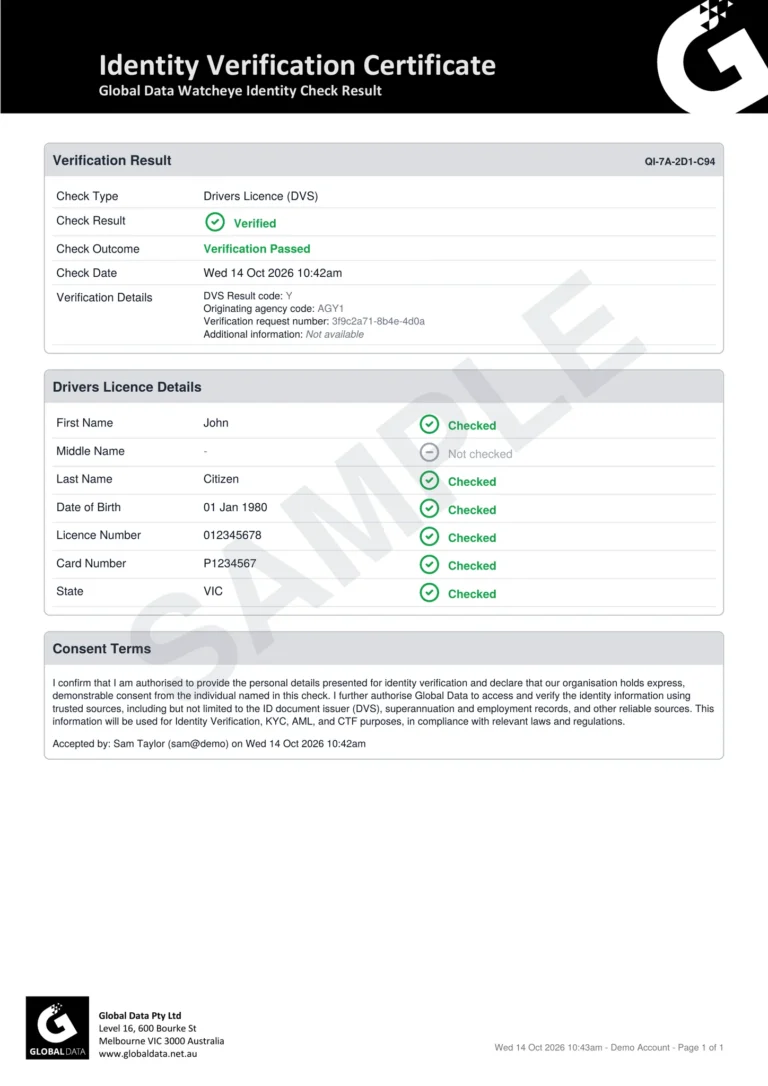
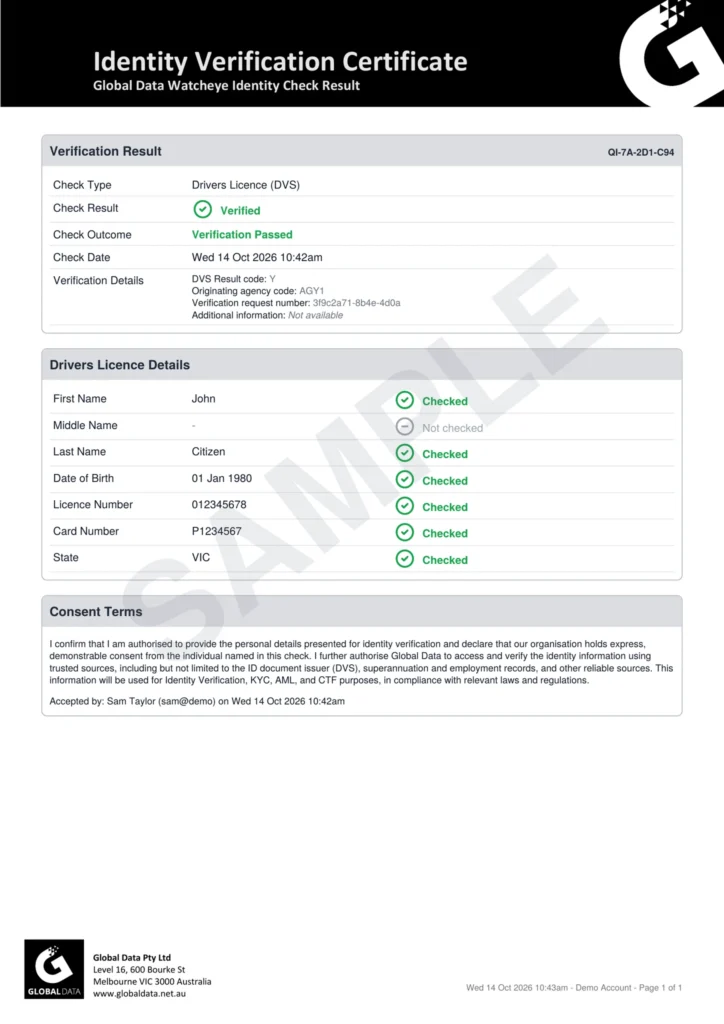
The certificate it produces
1The outcome. Identification Verified, for the check that was run.
2The details, consent and response. The licence details entered, who confirmed consent and when, and the DVS result, all kept with the check.
3The certificate. A PDF that lists each detail checked and the DVS result.
Your team’s next step. Record what your team concluded and any follow-up under your program.
Illustrative WatchEye result with mock data, shown alongside a sample certificate.
Illustrative findings. Next actions depend on your AML/CTF program.
Illustrative finding
What it means
Possible next action under your process
Document details matched
The submitted fields matched the selected source for that check.
Review other required evidence before progressing.
Details did not match, or the result was inconclusive
The check has not established the intended match. It is not by itself proof of fraud.
Check the inputs, request evidence or use an approved alternative.
Potential screening match
A source record may relate to the client or relevant person.
Compare identifying details and record the review outcome.
Ongoing checks
Monitor changes after onboarding
Move a Quick ID Check or Quick Screen result into a WatchEye program to keep checking that person or business. Scheduled screening raises Events for new findings, which your team reviews as part of your ongoing process. Monitoring supports the review; it does not make the decision for your team.
A monitor runs on a schedule to perform a screening check on every record in the program. Each program can have several monitors, each with its own schedule.
Monitor #Screening typeScheduleStatusLast run
M-16-609-6F8Adverse Media ScreeningSpecific Day: MondayActiveMon 12 Oct 2026 1:30am
M-43-40C-F66PEP and Sanction Screening1st of Every MonthActiveThu 1 Oct 2026 1:30am
EV-7C-1B2-0A4C-55-0AC-8DFAlex SamplePEP and Sanction Screening1 potential match to reviewThu 1 Oct 2026 1:31amNew
Matter clients › Alex Sample › EV-7C-1B2-0A4NewInvestigatingClosed – Dismissed
Event details
Event #EV-7C-1B2-0A4Screening sourcePEP and Sanction ScreeningScreening check #C-55-0AC-8DFDate createdThu 1 Oct 2026 1:31am
Match results
Alexander Sampel · 82% (name) · PEP list · Local councillor (2004–2013) · DOB 07/11/1958 · New Zealand
Entity
Alex Sample · DOB 14/03/1986 · Australia · Risk level Medium · No flags
Notes
S. Taylor · Fri 2 Oct 2026 10:12am
Different person. DOB and country do not match: listed person 07/11/1958, New Zealand. Our client’s DOB 14/03/1986 was verified against their driver licence (Quick ID Check); their address on file is in Australia. Dismissed.
Your team sets up a program, such as Matter clients, with its own risk level, retention period and event settings.Your team sets up a program, such as Matter clients, with its own risk level, retention period and event settings.Clients and relevant people are added to the program as entities, often by moving a Quick ID Check or Quick Screen result into it.Monitors rescreen every entity on a schedule, such as adverse media weekly and PEP and sanctions monthly.When a monitor finds something new, it raises an Event, such as the potential match on Alex Sample’s PEP and sanction check.Your team reviews the event, notes why it is a different person and closes it as Closed – Dismissed. The note records who decided and when.
Illustrative mockups of the WatchEye dashboard with a sample program and sample data, not product screenshots.
Software options
Choose how your team runs client checks
The options differ in who enters the details and where the result goes. Ask us about integration if checks need to run inside your existing software.
ID Pass
Create an ID Pass in WatchEye and send it by SMS or email. The client completes the document and liveness steps on their own device.
Software can support checks and evidence collection. Your firm still needs an appropriate AML/CTF program, responsible people, staff training and processes for reviewing and reporting relevant activity.
Your firm puts in place
An appropriate AML/CTF program
Responsible people
Staff training
Processes for reviewing and reporting relevant activity
No. Verification and screening tools support parts of the process. Your firm remains responsible for its obligations and for implementing an appropriate program and controls.
Can a client complete verification without visiting our office?
ID Pass provides a link-based verification process. The required document and biometric steps depend on the configured flow.
Does a potential PEP or sanctions match mean we must reject the client?
A potential match first needs assessment. Follow your documented process to establish whether the source record relates to the person and what action the circumstances require.
Can we keep our existing matter-management system?
Talk to us about how your team works. We can discuss whether browser-based checks or an API integration better suits your process.
How much does it cost, and how long does setup take?
Pricing and setup depend on the products, checks, volumes and access you need. Request a demo and we will outline the options for your scope.
Request a demo
See the workflow for your firm
Talk to us about a typical client-check scenario. Explore the verification, screening and monitoring options that fit your process, and discuss the evidence and access your team needs.
The demo covers
Your client-check scenario, step by step
Verification, screening and monitoring options for your process
The evidence and access your team needs
Prefer to talk? Call 03 9948 4089, 9am to 5pm AEST, Monday to Friday.
Get startedBook A Demo
"*" indicates required fields
lock
Encrypted in transit and at rest
gavel
Handled under the Australian Privacy Principles