










Customer Due Diligence
KYC due diligence to verify, screen and investigate
Support KYC due diligence with identity verification, screening and relevant background information. Run Quick ID Checks and review screening findings in WatchEye, with ID Pass available for remote customer capture and Caspar for further enquiries.
- Quick ID Checks in WatchEye, or customer capture with ID Pass
- PEP and sanctions findings with source details to compare
- Person Report and Caspar when the review needs more context








-
DVS Gateway
Service Provider
Overview
Build the evidence your review needs
Select checks around the customer relationship and the information you need to establish. Separate identity verification, screening and deeper background enquiries so each has a clear purpose.
-
WatchEye · ID Pass
Identity verification
Compare the customer's supplied details with relevant records and review the outcome of each selected identity check.
OutputA result for each check, kept separate
Identity checks -
WatchEye
Customer screening
Look for potential PEP, sanctions and other supported screening matches. Compare the finding with the customer's details before deciding whether it relates to them.
OutputPotential matches with source details to review
Screening review -
Caspar · Person Search
Enhanced due diligence
Get additional background information on a customer when your review needs more context, such as address history, linked records and corporate or court findings.
OutputAdditional background findings with their sources
Enhanced due diligence
- Select the checksIdentify the information your customer review requires.
- Review the findingsConsider the outcome, supporting detail and limitations of each check.
- Follow up the gapsObtain additional information where needed and document the next action under your process.
Customer due diligence includes initial and ongoing measures. Enhanced measures apply for high-risk customers and other specified circumstances. Software supports the evidence-gathering work within your organisation's process.
Identity checks
Check the customer's identity
Use the appropriate document and data checks for the customer. Review the outcomes before relying on that identity for further screening or investigation.
-
WatchEye Quick ID Check non-DVS
Compare personal details
Use Quick ID Checks in the WatchEye dashboard to run identity checks on supplied customer details. Review the returned results and investigate differences that matter to your enquiry.
Who enters the detailsYour staff, in WatchEye
-
WatchEye Quick ID Check DVS
Check document details
DVS checks compare the supplied details from supported identity documents with the issuing authority's records. A match relates to those details; it does not establish that the presenter owns the document.
Who enters the detailsYour staff, or the customer in ID Pass
Runs inside Quick ID Checks and ID Pass -
ID Pass
Support remote verification
Use a configured ID Pass journey where the customer needs to complete document or biometric capture on their own device. Keep document, face-comparison and liveness outcomes distinct.
Who enters the detailsThe customer, on their own device
Your team runs the check
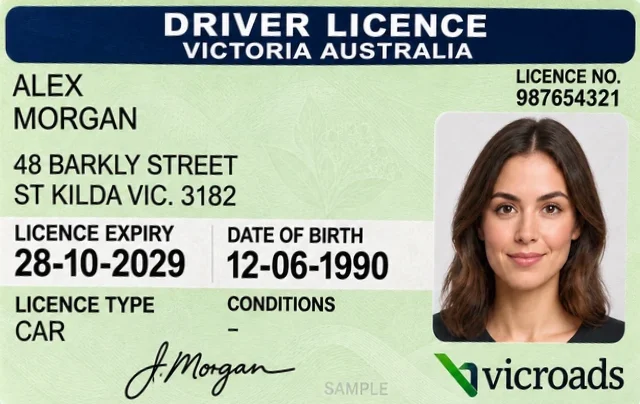
Reviewer follow-up. The MultiCheck passed on name, date of birth and phone, but the address and email did not match the Global Data Check. Ask whether Alex has moved recently and confirm current contact details before relying on them.
Customer completes ID Pass

Your team reviews the result

Illustrative WatchEye and ID Pass screens with mock data. Alex Morgan is a fictional person and the face is synthetic. Not product screenshots. Timing is explanatory, not a processing time.
API endpoints
Connect identity checks to your own systems. Request schemas and example calls are in the API reference. Sandbox available for integration testing.
Screening
Review potential screening matches
Compare returned screening findings with the customer's identifying details. Assess the source information before deciding whether a finding relates to the customer.
-
Compare the identifiers
Review the name and other available identifying details alongside the customer record. Similar names alone may not resolve whether two records describe the same person. -
Read the underlying finding
Consider the source, date and context. Identify what the finding establishes and which details still need corroboration. -
Decide the next review step
Follow your process for resolving an unrelated result, seeking more information or escalating the enquiry. A returned match is an input to review, not an automatic customer decision.
WatchEye supports screening and monitoring workflows. The checks and review configuration should reflect the requirements of your process.
Compare before deciding. The names are similar, but the dates of birth and countries differ.
About the 82%: how closely the customer's details match the listed record. 70–89% is a moderate match, which could be the same person or someone with a similar name.
Illustrative mockups of the WatchEye dashboard with a sample program and sample data, not product screenshots.
Enhanced due diligence
Add background information when the review needs more
Get additional background information on a customer with Caspar and the Person Report when your review needs more context. Select the enquiry around the unresolved question.
-
Bring related findings into a Person Report
Person Report combines WatchEye and Caspar capabilities to resolve the person from the details you hold and bring background findings into one report. Run it from Quick Reports in WatchEye, in Caspar or through the APIs, then review the source references and distinguish reported records from inferences or possible associations. -
Investigate a specific detail in Caspar
Use Caspar for targeted person and background enquiries, including relevant address-history or linked-record information. Compare the available identifiers and dates before relying on a connection. -
Keep uncertainty visible
A shared address, similar name or possible association can justify another question. It does not, by itself, establish that a record belongs to the customer or that the customer has done something wrong.
Enhanced customer due diligence can involve additional measures beyond a database search. Select those measures through your AML/CTF process and the circumstances of the customer.
A lead, not a confirmed link. The ASIC record holds a name and a previous address but no date of birth, so the report marks it not verified. Corroborate it before attributing it to Alex.
Illustrative WatchEye Quick Reports screens and a Person Report excerpt with mock data. Not product screenshots or a real report.
Another A. Morgan at the same address. Andrew P Morgan, born 1962, also fits the officeholder record's name and address. Corroborate before attributing that association to Alex.
Illustrative Caspar People Search, Record Detail and address search with fictional records. No automatic transfer from WatchEye to Caspar is shown.
Evidence review
Read findings as an evidence set
Consider the results together while preserving what each check established. Record unresolved questions and the basis for your team's next action.
Your team's next step. Follow up the details that did not match and record the outcome under your process.
Before your team acts on the results
- What was checkedIdentify the customer details submitted and the checks selected for the review.
- What came backKeep the result and available source information in context, including dates and limitations that affect interpretation.
- What needs attentionDocument discrepancies, uncertain links and additional information your team needs before proceeding.
- What happens nextRecord the review action through your organisation's process. Confirm the result access, export and record-handling options for the products you use.
Ongoing monitoring
Keep the review current after onboarding
For ongoing relationships, consider when customer details and screening results need to be revisited. Move a Quick ID Check or Quick Screen result into a WatchEye program, and configured monitors rescreen the customer on a schedule.
Monitoring supports the review; it does not make the decision for your team. Confirm the supported checks and schedule for your process.
Illustrative mockups of the WatchEye dashboard with a sample program and sample data, not product screenshots.
Access options
Choose tools around your process
Discuss which checks your staff will run, which customers will complete remotely and which steps belong in your own systems. Confirm the available routes for each capability.
-

WatchEye
Run Quick ID Checks, send ID Pass links, screen customers and monitor them in a program, with Events for your team to review.
- Details entered by
- Your staff
- Result appears in
- Quick ID Checks, screening and Events, with PDF certificates
-

ID Pass
Create an ID Pass in WatchEye and send it by SMS or email. The customer completes the document and liveness steps on their own device.
- Details entered by
- The customer, from a link
- Result appears in
- Quick ID Check list in WatchEye
-

Person Report
Resolves a person from the details you hold and consolidates background findings, each with source references. Available in WatchEye, Caspar and the APIs.
- Details entered by
- Your staff, or your system
- Result appears in
- WatchEye Quick Reports, Caspar or the API, with a PDF report
-

Caspar
Targeted person and background enquiries, including address history, occupancy and linked records, with a detailed record view.
- Details entered by
- Your investigators
- Result appears in
- Caspar People Search and record detail
-

Global Data API
Connect supported checks to your own software, with an endpoint for each check.
- Details entered by
- Your system
- Result appears in
- The API response
Explore the relevant API documentation when selecting your integration. The Person Report API is currently marked experimental and subject to change.
Getting started
Before you start
Work through these points with your team before the demo. We'll use your answers to show the checks that fit how you review customers.
- Identify the customer scenarios and information you need to assess.
- Confirm the required checks, access permissions and customer consent steps.
- Agree who will review findings and how unresolved questions will be handled.
- Confirm integration, result availability and evidence-handling requirements.
How does KYC differ from KYB?
This page focuses on individual customers. KYB adds enquiries about a business, its ownership and the people connected to it. Where a business relationship involves individuals who also need checking, both sets of enquiries may be relevant.
Is identity verification the whole KYC process?
No. Identity verification addresses who the customer is. Customer due diligence also involves understanding and managing the risks of the relationship, with additional and ongoing measures where required.
Does every customer need every check?
No. Select checks and any further enquiries according to your organisation’s obligations, customer risk and due diligence process. Confirm which capabilities are available through each product.
Does a screening match mean the customer should be declined?
A potential match needs review. Compare the identifiers and underlying source information, then follow your organisation’s process and any applicable requirements. Do not treat a name match as a completed identity or risk assessment.
When is enhanced customer due diligence needed?
AUSTRAC describes enhanced CDD as additional measures for high-risk customers and other specified circumstances. It can apply during initial or ongoing due diligence. The appropriate measures depend on the circumstances, not simply on choosing a larger bundle of searches.
What evidence can our team retain?
Result access and export options vary by product and check. Confirm the records available, how your team will retrieve them and the retention arrangements needed for your process. Do not assume every API response remains available indefinitely.
Request a demo
Map the checks for your customer review
Bring a typical customer scenario and explore the verification, screening and supporting information relevant to your process.
Prefer to talk? Call 03 9948 4089, 9am to 5pm AEST, Monday to Friday.
"*" indicates required fields
- Approved DVS Gateway Service Provider
- ISO 27001 certified
- Data hosted in Australia