







Skip to content
New

Person Report API and New Zealand identity checks are now live.

See what's newarrow_forward
WatchEyeOnboarding & monitoring

Customer onboarding, screening and ongoing monitoring in one system, with real-time KYC and KYB alerts when a customer's risk changes.

Visit WatchEyearrow_forwardcheck_circleIncluded in the Global Data Portal
IDFEX ID CheckIdentity verification

One-to-one identity, document and data checks against the DVS and Australian data sources, run from the Portal or by API.

Visit IDFEX ID Checkarrow_forwardcheck_circleIncluded in the Global Data Portal
ID PassSelf-service verification

Customers verify their own identity and biometrics from a link on their phone. The result comes back to you, and they keep control of their data.

Visit ID Passarrow_forwardcheck_circleIncluded in the Global Data Portal
InsiightData quality

Verifies, corrects and enriches customer records so they stay accurate — one at a time or across your whole database.

Visit Insiightarrow_forwardcheck_circleIncluded in the Global Data Portal
Australian Death CheckDeceased data

The official national death data source. Match your records against it to find and remove deceased individuals.

Visit Australian Death Checkarrow_forwardcheck_circleIncluded in the Global Data Portal
QuesterMarketing lists

Build targeted, privacy-compliant Australian marketing lists with smart filters. Pay only for the records you download.

Visit Questerarrow_forwardcheck_circleIncluded in the Global Data Portal
verified_userVerify Identities7 solutions

Confirm a person or business is who they claim to be: government IDs, biometrics, business registries and employment checks against authoritative Australian sources.

All solutionsarrow_forwardcheck_circleAvailable in the Portal and by API
policy_alertScreen & Monitor7 solutions

Meet AUSTRAC obligations and understand customer risk: screening, risk assessment, fraud controls and investigation tools with evidence recorded for each check.

All solutionsarrow_forwardcheck_circleAvailable in the Portal and by API
databaseImprove your data3 solutions

Keep customer records accurate and put them to work: correct and enrich existing data, unify it into a single view, or build compliant marketing lists from opted-in records.

All solutionsarrow_forwardcheck_circleAvailable in the Portal and by API
monitoringWatchEye API14 categories

The WatchEye API gives programmatic access to everything in WatchEye: PEP and sanctions screening, identity checks, IDPass verifications, monitoring programs, events and reports.

View allarrow_forwardcheck_circleSandbox environment for integration testing
policyAML & screening5 use cases

Obligations under the AML/CTF Act, from screening at onboarding through to ongoing monitoring — with the evidence for each check recorded.

All use casesarrow_forwardcheck_circleMapped to the products and data that cover it
how_to_regOnboarding & identity3 use cases

Verifying who a customer, employee or account holder is — at sign-up and during ongoing checks — against authoritative Australian sources.

All use casesarrow_forwardcheck_circleMapped to the products and data that cover it
databaseData & enrichment4 use cases

Keeping customer records accurate, current and complete: validate contact detail, fill the gaps, locate people and remove deceased records.

All use casesarrow_forwardcheck_circleMapped to the products and data that cover it
Global Data
Portalarrow_forward
Productsexpand_more
Solutionsexpand_more
Use casesexpand_more
Dataexpand_more
APIarrow_forwardIndustriesarrow_forwardResourcesarrow_forwardAboutarrow_forwardContactarrow_forward Request a Demo
Talk to the team

9am–5pm AEST, Monday to Friday.

call03 9948 4089

Verify Identities

Identity Verification

Check customer details against Australian data sources and identity document details against issuer records through the DVS. Use WatchEye, send an ID Pass link or integrate selected checks through the Global Data API.

  • Compare document details with government issuer records
  • Check personal details against selected data sources
  • Add face matching and liveness for remote verification
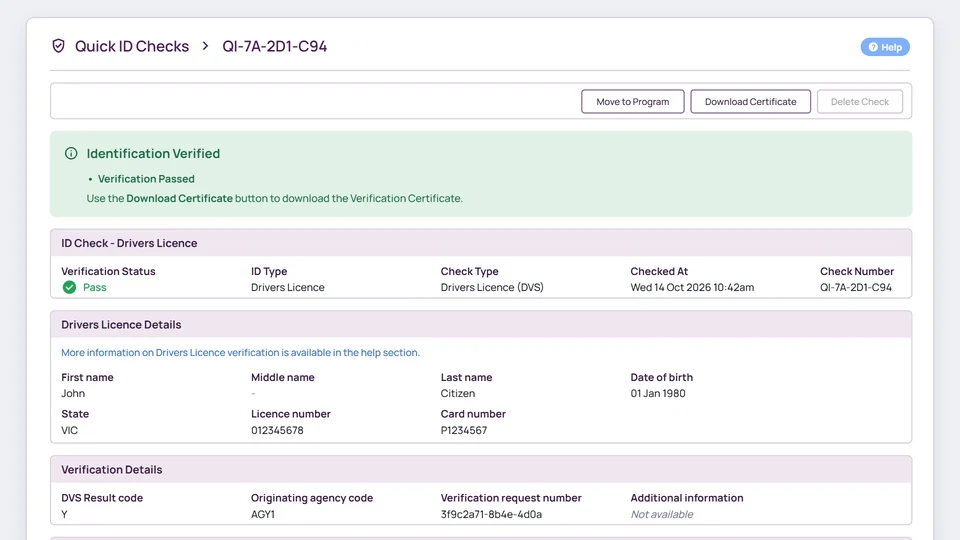
WatchEye/Quick ID Checks
Quick ID Checks › QI-7A-2D1-C94Help
Move to Program Download Certificate Delete Check
Identification Verified• Verification PassedUse the Download Certificate button to download the Verification Certificate.
ID Check - Drivers Licence
Verification StatusPass
ID TypeDrivers Licence
Check TypeDrivers Licence (DVS)
Checked AtWed 14 Oct 2026 10:42am
Drivers Licence Details
First nameJohn
Last nameCitizen
Date of birth01 Jan 1980
StateVIC
Verification Details
DVS Result codeY
Verification request number3f9c2a71-8b4e-4d0a
Originating agency codeAGY1
Checking details with the DVS…
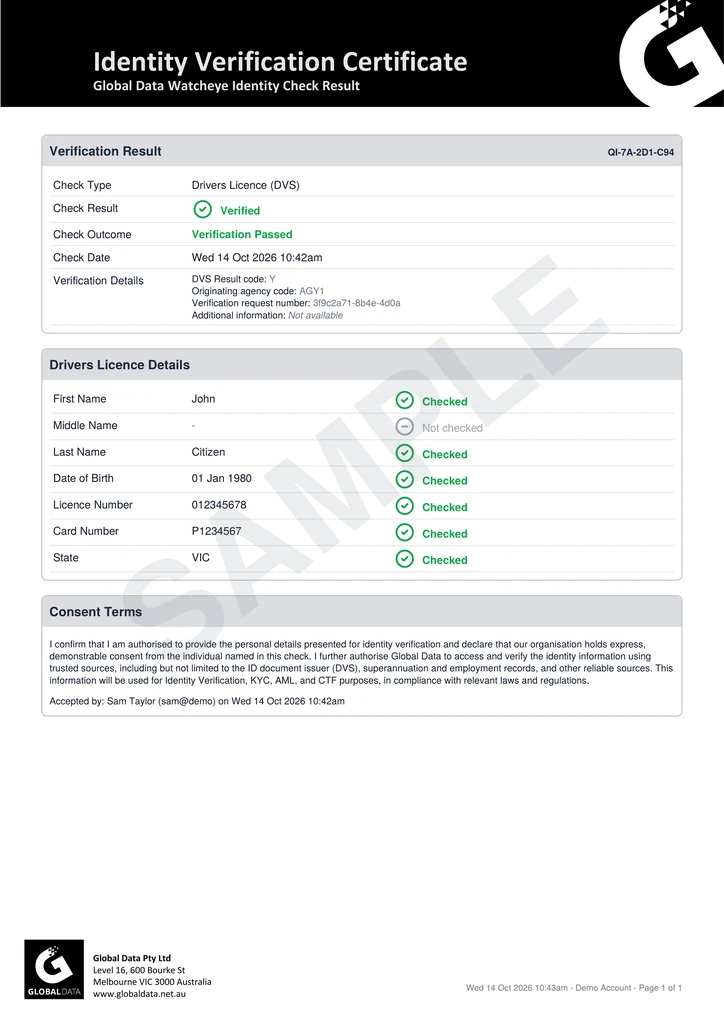
Sample Identity Verification Certificate from the check, marked SAMPLE
Illustrative WatchEye Quick ID Check and ID Pass screens with mock data. Checks and access depend on your configuration.
Trusted by
  • Suncorp
  • Zurich
  • LSEG
  • Australian Unity
  • Beyond Bank Australia
Certified
  • ISO 27001 certified
  • DVS Gateway
    Service Provider
  • Australian Death Check

Checks

Choose the checks your workflow needs

Each check answers a different question about the customer. Build your process around what you need to establish and how customers deal with your business. The checks available to you depend on your service and configuration.

Document check

Document verification

The question it answersDo these document details match the issuer's record?

Details from a supported identity document are compared with the issuing authority's records through the Document Verification Service.

Documents you can verify through the DVS
  • Driver licence
  • Australian passport
  • Foreign passport with an Australian visa
  • Medicare card
  • Centrelink concession card
  • ImmiCard
  • ASIC/MSIC card
  • Birth certificate
  • Citizenship certificate
  • Registration by descent certificate
  • Change of name certificate
  • Marriage certificate
  • Death certificate

ID Pass supports driver licence, passport, Medicare, visa, Centrelink and birth certificate checks.

New Zealand documents
  • NZ driver licence
  • NZ passport

These are checked against New Zealand sources, not the DVS.

Explore document verification

Data check

Identity data matching

The question it answersDo the personal details agree with independent records?

Supplied personal details are compared with selected Australian data sources. Use the matches and differences returned to decide where you need more information.

Non-DVS checks in WatchEye
  • ASIC ID Check
  • Global Data Check
  • Payroll and superannuation
Explore our data sources

Optional biometrics

Face matching and liveness

The question it answersIs a real person present, and do they match the document photo?

In ID Pass, the customer records a short selfie video. A liveness assessment checks that it is a live person, and their face is compared with the photo on their licence or passport.

Face comparison needs a photo document. Medicare, Centrelink and birth certificate checks do not include it.

Explore biometrics and liveness

Ways to verify

Verify customers remotely or through your team

Customers can verify themselves from a link on their phone, or your staff can run a check with details they already hold. Choose the path that suits the customer and the way you onboard.

Path A · Customer-completed

Remote verification with ID Pass

Create an ID Pass in WatchEye and send the customer a single-use link by SMS or email. You choose the documents, how many are needed and whether to include liveness. The result comes back to your Quick ID Check list.

The customer opens the link on their phone. ID Pass shows your organisation's name and the steps they will complete.

Illustration of the ID Pass flow with a sample organisation and mock details. Steps depend on your configuration.

Explore ID Pass

Path B · Staff-run

Staff checks with WatchEye Quick ID Check

Quick ID checks are one-off checks your team runs in WatchEye. The result comes back immediately, and the customer does not need to be in a program first. Run a DVS document check, or non-DVS checks against ASIC records, Global Data's identity data and payroll and superannuation records.

Quick ID Checks lists recent checks with their outcome. Start a DVS check from the panel at the top.

Illustrative mockups with sample data, not product screenshots.

Explore WatchEye

What a DVS match tells you

Global Data uses the Document Verification Service (DVS) to verify a person’s government-held identity documents.

The DVS allows for instant, online identity verification. A person’s name, address, date of birth and identity documents may be confirmed against government-held records. The DVS supports businesses to meet ‘know your customer’ requirements and to combat fraud and identity crime.

Path C · From your software

Run checks from your own system with the API

The WatchEye API runs the same Quick ID checks from your onboarding or case-management software. An ID check returns its result in the same response. You can also create an ID Pass through the API and send the customer the hosted link yourself.

  • Your system collects consent and keeps the exact wording shown. Each request confirms it was obtained.
  • Document numbers are never returned in responses.
  • ID checks return the outcome in the same response, with nothing to poll.
  • A sandbox account lets your developers test before going live.
View the API documentation
Your developers connect your API key with a first call to the account endpoint. It confirms the key works, whether you are pointed at sandbox or live, and which checks your account can run.

Illustrations with sample data, based on the WatchEye API documentation. Not product screenshots.

How a check runs

Run a check and review the result

The steps are the same whether your staff run the check, the customer completes it on their phone or your system calls the API.

  1. Collect the details and consent

    Choose the checks your process calls for and obtain the customer's consent. Staff enter the details, the customer completes an ID Pass, or your system sends them through the API.

    OutputCustomer details with a consent record

  2. Run the selected checks

    Each check compares the supplied information with its own source. Where configured, ID Pass also captures a selfie video for liveness and face comparison.

    OutputA separate result for each check

  3. Review and decide

    Review the outcomes against your verification policy. Where something does not match, follow up with the customer before you record your decision.

    OutputA decision your team can explain

Biographic verification

See how supplied details compare with independent records

Supplied personal details are compared with selected Australian data sources. A MultiCheck runs several of these checks together and shows, for each detail, whether each source matched it, did not match it or did not check it.

Investigate the differences that matter under your verification policy before you ask for more information.

Quick ID Check · MultiCheck Verification Passed

MultiCheck runs one or more ID checks in one group and shows the result of each. The overall MultiCheck passes if any of the selected checks pass.

DetailASIC IDGlobal DataPayrollSuper
PersonAlex Morgan, 12 Jun 1990 ASIC ID: MatchGlobal Data: MatchPayroll: No matchSuper: Match
Address14 Sample St Carlton VIC 3053 ASIC ID: Not checkedGlobal Data: MatchPayroll: No matchSuper: Match
Emailalex@example.com.au ASIC ID: Not checkedGlobal Data: No matchPayroll: No matchSuper: No match
Phone0412 345 678 ASIC ID: Not checkedGlobal Data: No matchPayroll: No matchSuper: Match
Reading the result
Person
Matched by 3 of 4 sources
Email
No source matched it
Next step
Investigate the differences that matter under your verification policy.
Illustrative example with mock details. The data sources available depend on your service and configuration.

Face verification and liveness

Confirm the customer is the person in the ID photo

During the liveness check, ID Pass captures an image of the customer’s face, called the probe image. A biometric face verification algorithm compares it with the photo on the identity document, such as the licence or Australian passport photo, to make sure they are the same person.

Review the result alongside the other identity evidence, and follow your process if a capture fails or is not completed.

Liveness score 96% · Passed
70% cut-off 96%
False face video
typically below 20%
Desktop
70–90%
Mobile
90–99%
Biometric validation

Compares the photo of the person on the document to the face (probe image) obtained from the liveness check.

Outcome
Passed
Face match against probe image
Yes
Face match similarity
96%
Pass threshold
70.000%
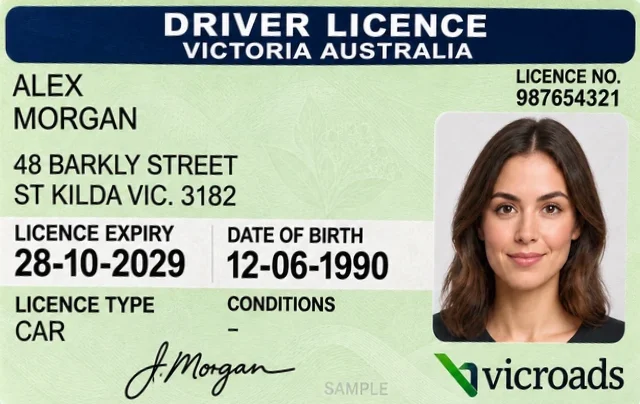
Illustrative example using a sample driver licence. Face verification runs for each photo document the customer provides.

Customer journey

Guide customers through capture

ID Pass is a step-by-step flow optimised for mobile devices, and it also works on a desktop computer with a webcam. Clear prompts show customers what to capture and when they are done.

Illustrative ID Pass screens with a sample organisation and mock details. Choose a step to see its screen. Steps depend on your configuration.
Explore ID Pass

OCR document capture

Extract document details into the ID Pass form

OCR reads details from a supported identity document and pre-fills the relevant fields in the ID Pass form, reducing manual entry. The customer checks them, and the extracted details are then used in the next configured checks.

Illustrative OCR extraction with fictional document details. Extracting text is separate from verifying the details with the DVS or comparing the customer's face.

Results

Read each result before you decide

Every check returns its own outcome, and the record keeps the details entered, who confirmed consent and the source's response. Your team decides whether the evidence is enough to proceed.

The result in WatchEye

WatchEye Quick ID Check QI-7A-2D1-C94: Identification Verified, Verification Passed. Drivers Licence (DVS) checked Wed 14 Oct 2026 at 10:42am, with the licence details and DVS result code Y.

The certificate it produces

Identity Verification Certificate for check QI-7A-2D1-C94, marked SAMPLE, listing each licence detail checked.

WatchEye product screenshot and sample certificate, both with mock data.

Follow up when a result does not match

A failed result tells you a check did not establish a match. It is not a fraud finding on its own. In this example the customer’s licence passed the DVS check, but the name entered when the ID Pass was created does not match the licence.

After confirming the correct name with the customer, staff can correct the entered details. The result updates and the record shows the change.

Labels used on this page
  • Check complete
  • Review required
  • Your team's decision
The Quick ID Check list shows an ID Pass that failed. Open it to see why.

Illustrative mockups with sample data, not product screenshots.

What each result tells you

Each check answers its own question. Base your next step on the result, the other evidence and the customer’s circumstances.

Helps establish
  • Whether the submitted details match the issuer record
  • How the supplied details compare with the selected data sources
  • Whether the captured face corresponds with the document photo
  • Whether the capture passed the liveness assessment
Doesn't establish
  • That the person presenting a document owns it, from a DVS match alone
  • Fraud, from a non-match alone

Access options

Choose how your team runs checks

The options differ in who enters the details and where the result goes. Many organisations use more than one, for example staff checks at a branch and ID Pass for remote applicants.

  • ID Pass

    Send a single-use link by SMS or email. The customer completes the document and liveness steps on their own device.

    Details entered by
    The customer, from a link
    Result appears in
    Quick ID Check list in WatchEye
    About ID Pass
  • WatchEye Quick ID Check

    One-off checks your staff run with details they already hold: a DVS document check, or ASIC, Global Data and payroll checks.

    Details entered by
    Your staff
    Result appears in
    Check list and PDF certificate
    About WatchEye
  • WatchEye API

    Run ID checks and create ID Passes from your own software. Confirm the inputs and responses for each check type in the documentation.

    Details entered by
    Your system
    Result appears in
    The API response
    API documentation

Getting started

Plan access around your requirements

Tell us how customers join your business and which checks you need. We can then talk through the right service, setup and commercial terms.

Before your first DVS check

  • Register for the DVS. Registration is free for Australian businesses and your Global Data account manager arranges it.
  • Obtain express consent before each DVS check and keep a record of it.
  • Decide which documents and checks your verification policy calls for.
IDMatch: consent obligations(opens in a new tab)

Bring to the demo

  • A typical onboarding scenario
  • The documents your customers usually hold
  • Expected monthly volumes
  • The systems your staff already use
Request a Demo

Questions

Identity verification questions

For reporting entities, see AUSTRAC's guidance on initial customer due diligence.

How does identity verification support KYC?

It gives you evidence to help establish a customer’s identity. AUSTRAC guidance calls for reliable and independent sources when reporting entities verify KYC information. Your AML/CTF policies set the checks you need and when extra due diligence applies.

What happens if details do not match?

Review the submitted details and the response before deciding what to do. You may need corrected information, another document or further evidence. An unsuccessful check is not a fraud finding on its own.

Are biometrics included in every check?

No. Liveness and face comparison are options you choose when creating an ID Pass. Staff-run DVS checks compare document details only.

Do customers need to install an app?

No. ID Pass opens in the browser from a link. It is designed for phones and also works on a computer with a webcam.

Can we check New Zealand documents?

Global Data has a separate New Zealand identity verification solution. Check its coverage and access options against your requirements.

What does identity verification cost?

It depends on the checks, the access method and your volumes. An ID Pass is priced by the number of documents requested. Request a demo and we will outline the options for your scope.

Request a demo

See how identity verification fits your workflow

Tell us how you onboard customers and what you need to verify. We will show you the relevant checks, what the results look like and how your team would access them. Use the call to cover:

  • Staff, customer and API options for your process
  • The documents your customers usually provide
  • DVS registration and consent requirements

Prefer to talk? Call 03 9948 4089, 9am to 5pm AEST, Monday to Friday.

Get started Book A Demo

"*" indicates required fields

This field is for validation purposes and should be left unchanged.
Full Name*
  • Approved DVS Gateway Service Provider
  • ISO 27001 certified
  • Data hosted in Australia